Data Flow & Usage — Operator's Reference
The pipeline produces four deliverables — standalone HTML data visualizations and exploratory tools, one per downstream stage:
- palette_explorer.html
- archetype_distribution.html
- drift_comparison.html
- coverage_distribution.html
None of them can be built until the data_prep stage has extracted clustered color data from source images.
Deliverables can be built using a sequence of CLI commands.
Tunables are modifiable constants, keyword dictionaries, threshold files, etc… that influence output deliverables.
Legend
Solid arrows show data flow — each command reads the output file produced by the previous one. Dotted teal lines link a tunable to the command it configures.
data_prep
Runs once per brand, turning raw product images into clustered color data. Provides the data that feeds the four key deliverables.
❯ cli.py segment <b>
Runs the YOLO11l/Fashionpedia model over every unprocessed archive's product photos, isolates the hero garment with attribute merging (sleeves, collars), and writes a transparent PNG mask plus one segment_fpyolo11l241114 row per product.
no <g> — segment runs the whole brand catalog; gender is split later, at
consolidate-colorsinstance_id, archive_id_ref, title, title_secondarchive_id_ref, instance_id_ref, class_id, class_name, conf, is_hero<aid>-<iid>-<fam>-<rank>-<pid>-fpyolo11l241114-<seg_id>.png — transparent garment masksprocessing_log.txt — per-product results + countersget_unprocessed_archives only processes archives absent from segment_fpyolo11l241114, so a re-run never re-segments a done archive. Each run drops a fresh timestamped mask folder; it does not overwrite a prior one.- Source: a Python list concatenating category sub-lists (product-type exclusions, generic terms, states, cities, colleges, countries, sports terms, and pro rosters — soccer/football/basketball/baseball/hockey) —
data_prep/heraldic_filter.py - Role: pre-inference filter — a title hitting a team roster (NFL/NBA/MLB/NHL/soccer), a US city, a college/NCAA, or an Olympic-country term is dropped before YOLO ever runs. These carry prescribed team colors, not the brand's own design choices. Matched case-insensitively as
\b(word)\bagainst bothtitleandtitle_second. - How to tune:
discover-heraldic-keywords·validate-heraldic-filter - Tuning output: 📄
candidates.csv(brand-skew-ranked additions) · 🖥labeler.html(blind hand-labeling, prediction hidden to avoid anchoring) · 📄analysis.txt(precision / recall / F1 + Wilson CIs). Last measured: 95.6% recall, 81.8% precision on 800 labels.
- Source: a per-brand dict (title word → Fashionpedia class synonyms) —
data_prep/keyword_maps.py - Role: picks which detected garment is the target. A title word (“hoodie”, “polo”) maps to a Fashionpedia class, and the largest YOLO mask of that class becomes the hero garment; a title with no mapped word drops the product. Recognition coverage ~80–98% by brand (98% Nike).
- How to tune:
validate-keyword-map - Tuning output: 📄 per-brand coverage % over denominator + a list of uncovered titles (mirrors the SQL regex-inversion behind the original 98% Nike figure)
- Source: float constants —
data_prep/segment.py - Role: attribute-merge gate. Once the hero garment is chosen, each detected attribute (sleeve, collar, cuff, hood, pocket, zipper, …) or secondary garment is folded into the hero mask if its IoU with the hero box > 0.15 OR its overlap with the dilated hero mask > 0.1 — capturing contrasting sleeves/collars that are part of the garment's palette. Lower = more aggressive merging.
- How to tune: no command — hand-judged. Read the per-product merge line (candidates evaluated / merged / Avg IoU / Avg Overlap) in
processing_log.txt, compare the merged masks against the source images, adjust the constants, and re-run. - Tuning output: 📄
processing_log.txt(per-product merge counts + IoU/overlap averages), inside each segmentation output folder
❯ cli.py extract-colors <b>
K-means-clusters the segmented garment pixels in LAB space into five dominant colors per product, storing their LAB coordinates and coverage percentages as the raw palette data every downstream deliverable reads.
no <g> — runs the whole brand catalog; gender is split later, at
consolidate-colorsarchive_id_ref, instance_id_ref, segment_idarchive_id_ref, instance_id_ref, segment_id_ref, lab_l, lab_a, lab_b, perc, cluster_rankget_unprocessed_archives only processes archives absent from cluster_fpyolo11l241114_kmeans250218, so a re-run never re-clusters a done archive.- Source: int constant —
data_prep/cluster.py - Role: dominant colors extracted per garment. K-means (k=5) runs on the garment's masked pixels in LAB space; the 5 centroids and their coverage % become that product's palette and feed every downstream deliverable. Clustering is done in LAB (not RGB) so Euclidean distance tracks perceptual difference.
- How to tune: no tuning command — 5 is a fixed design choice. There is no automated grader, and changing it would ripple through every downstream stage, so it's held constant.
data_prep/cluster.py, not a knob: RANDOM_SEED = 42 (k-means determinism), IMAGE_DIR env var (image search root, default ./images).palette_explorer
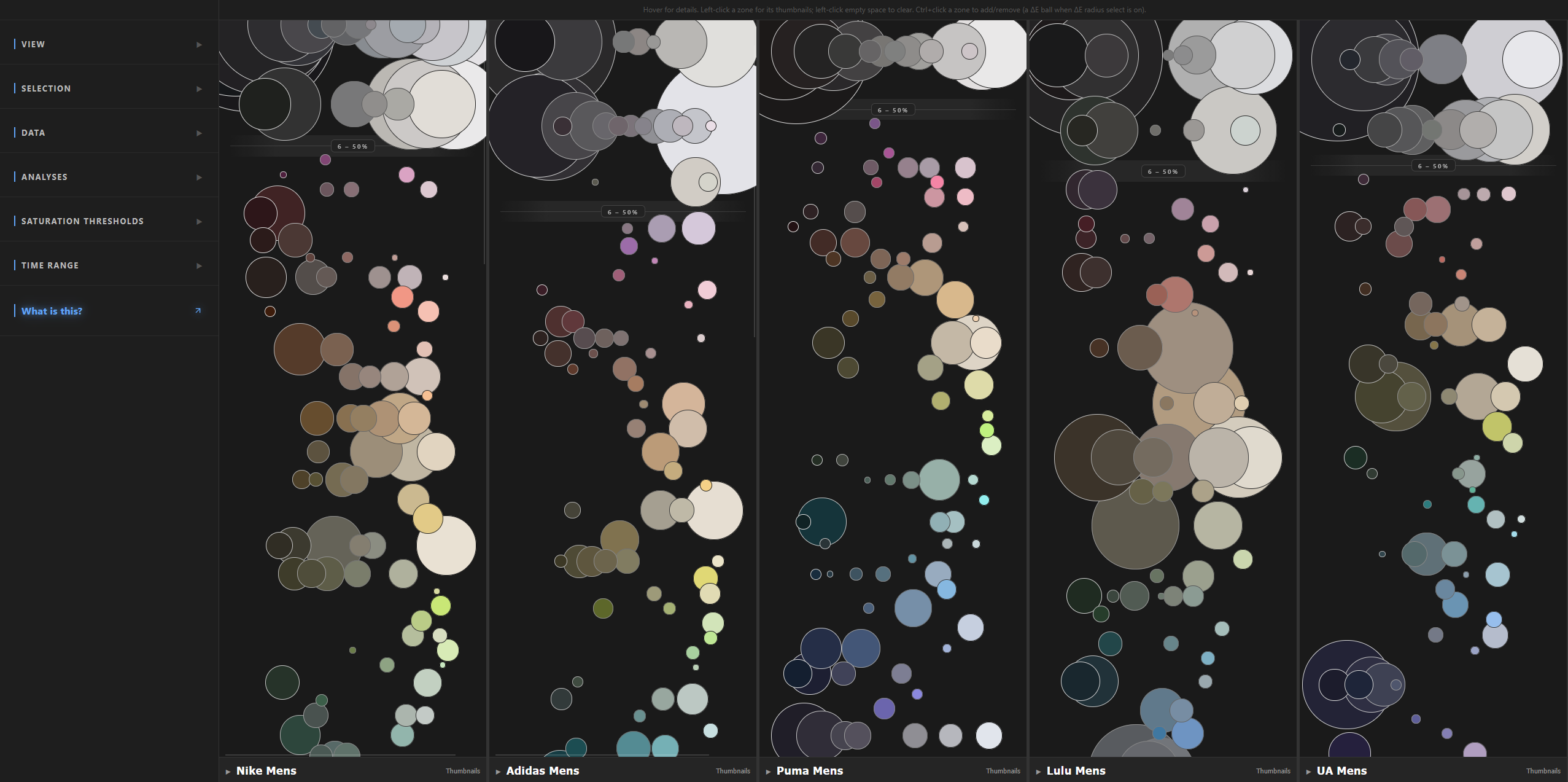
palette_explorer.html — the headline deliverable: a single at-a-glance view of a brand's entire color distribution. Two HAC passes consolidate every product's dominant color into internally-coherent zones (ΔE = 8), group those into hue families, and an adaptive layout renders them as population-scaled circles in lightness-ordered rows.
❯ cli.py consolidate-colors <b> <g>
First HAC pass over every product's dominant color at ΔE = 8 (CIEDE2000), producing tight, internally-coherent clusters that later merge into zones; also computes per-cluster geometry and discount statistics. The hue-merge rule runs earlier in this stage to collapse lighting-artifact duplicates within each product's own 5-color palette before consolidation.
<g> — gender (default mens)
cluster_centroids.csvproduct_assignments.csvcluster_summary.csv (geometry + discount stats)run_metadata.csvAlso configures this stage — see the shared tunables section for full detail.
- Source: int constant (CIEDE2000 ΔE diameter) —
palette_explorer/build_color_clusters.py - Role: HAC Pass 1 diameter: products within ΔE = 8 (CIEDE2000) form one cluster. Intentionally tight (over-discriminative) to keep clusters pure where dissimilar colors sit close; the resulting over-segmentation is corrected downstream by zone merging.
- How to tune: Iterative human-review loop. Run
consolidate-colors <brand> --gender <g>to build clusters at the current value, thenreview-cluster-quality <brand> --gender <g>to render that same segment for inspection. Adjust the constant and re-run both until clusters hold together by eye. - Tuning output: A self-contained HTML page at
outputs/diagnostic_cluster_review/<brand>_<gender>/cluster_review.html— one tab per cluster, each showing that cluster's 20 most color-diverse products (farthest-point CIEDE2000 sample, chosen to surface misfits).
❯ cli.py assign-zones <b> <g>
Groups CIEDE2000 clusters into zones via a random forest trained on Nike-mens manual zone labels, followed by agglomerative clustering on (1 − RF probability). Transfers the manual Nike-mens zone taxonomy to the other nine brand/gender segments; on Nike-mens itself, runs in cross-validated self-check mode.
<g> — gender (default mens) — the target to be labeled, never the training source
cluster_centroids.csvcluster_summary.csv, product_assignments.csv for thumbnails- Source: the hand-built reference file
outputs/nike_mens/cluster_zones.json— cluster→zone assignments created viabuild-zones. (The ~9 filesassign-zoneswrites for other segments are its outputs, not this tunable.) - Role: HAC Pass-1 clusters are deliberately over-discriminative; zones merge the near-identical ones into human-meaningful groups. assign-zones trains a Random Forest on the reference labels and propagates that merging to the remaining ~9 brand/genders.
- How to tune: hand-label nike/mens once —
build-zones nike --gender mens→ label in the tool → export — thenassign-zones <b> <g>propagates it to the other ~9 segments. (To use a different segment as ground truth, change TRAINING_BRAND / TRAINING_GENDER inpalette_explorer/assign_zones.py.) - Tuning output:
cluster_zone_builder.html(the labeling tool)
- Source: float constant CONFIDENT_MERGE_PROB = 0.80 —
palette_explorer/assign_zones.py. (scipy's linkage merges on distance, so the code derives 1 − 0.80 = 0.20 inline at the merge step — there's no separate distance constant.) - Role: the RF scores each pair of target clusters with a “same-zone?” probability; agglomerative complete-linkage merges only pairs it's ≥ 80% confident about. Higher = stricter (more, smaller zones); lower = looser (fewer, broader zones).
- How to tune: run
assign-zones nike --gender mens(self-validation). Read the printed ARI/NMI agreement scores; if they're too low, use the Manual-zones vs Auto-zones counts to see whether the RF is over-merging (fewer auto zones) or under-merging (more), adjust CONFIDENT_MERGE_PROB, and re-run until the scores plateau — before propagating to the other segments - Tuning output:
auto_cluster_zones.json(the RF's version, saved for optional cluster-level inspection — the tuning decision is read from the console ARI/NMI)
❯ cli.py palette-explorer
Renders the finished zones as population-scaled circles ("zones") laid out in lightness-ordered rows, packaging the result as the interactive palette_explorer.html deliverable.
palette_explorer.py:2971)cluster_summary.csv (geometry + discount stats) · cluster_zones.json (zone grouping) · run_metadata.csv (brand baselines) · product_assignments.csv (per-product price + archive, for Price and Time Range modes) · thumbs/ (product images). Missing segments are skipped with a warning; zero segments found is a hard error.- Source: a default argument
radius=5onload_brand_data()(palette_explorer/palette_explorer.py:239), passed explicitly at its only call site (palette_explorer.py:2983) — so editing the signature default alone changes nothing; edit the call. The grouping logic isfind_ab_groups()inpalette_explorer/hue_family_grouping.py, the single definition shared withtune_hue_family_rows.pyso the explorer and its tuner can't drift. - Role: HAC Pass 2 — complete-linkage grouping of zone centroids in the a*b* plane. Every pair inside a family must be within 5 a*b* units of every other (no chaining). Purely presentational: it sets the row scaffolding of the layout and never touches cluster or zone data.
- How to tune: run
tune-hue-family-rows <b> --gender <g>, which sweepsRADII_SWEEP = [5, 7, 10, 14](tune_hue_family_rows.py:37) and renders one full column preview per radius for that segment. Compare by eye, then write the chosen value into theradius=argument at the call site and re-runpalette-explorer. - Tuning output:
outputs/<b>_<g>/hue_family_tuning/ab_neighbor_diagnostic.html— all four radii in one page, each row an L*-sorted swatch strip labeled with its zone count and L* span, plus the singletons — andab_column_preview_R5.html,_R7,_R10,_R14in the same folder, each a full column preview with a click-through thumbnail panel (thumbnails come from the segment'sthumbs/, so they appear only onceassign-zonesorbuild-zoneshas generated them).
archetype_taxonomy
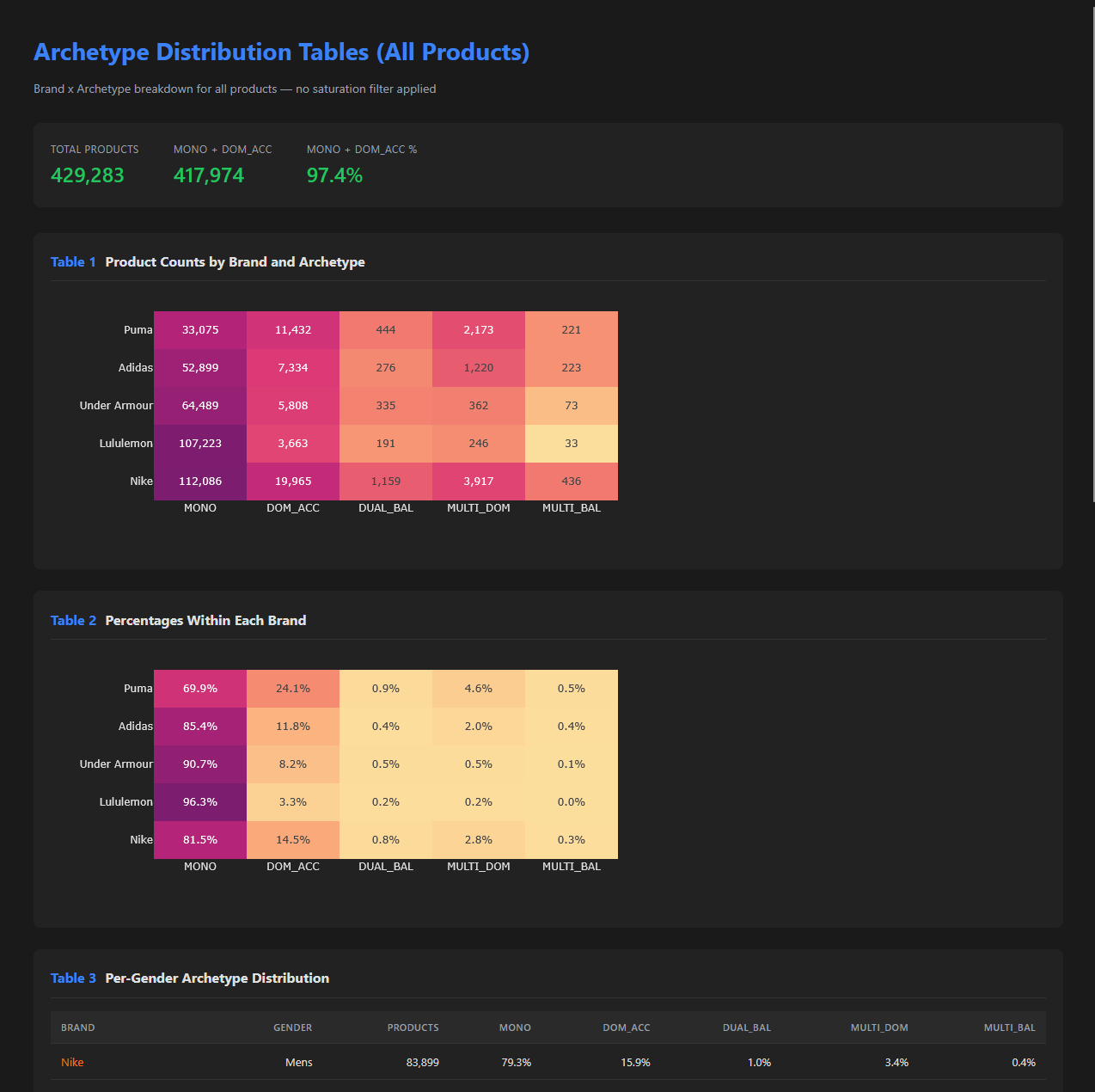
archetype_distribution.html — classifies each product by color structure into one of five archetypes (MONO, DOM_ACC, DUAL_BAL, MULTI_DOM, MULTI_BAL) from how many significant color clusters survive merging and how dominant they are, then reports the mix across the brand (≈92% of the catalog is single-color).
❯ cli.py archetypes
Classifies every product across all five brands and two genders into one of five palette archetypes (MONO, DOM_ACC, DUAL_BAL, MULTI_DOM, MULTI_BAL) based on how many significant color clusters survive hue-aware merging and how dominant they are.
classify_archetypes.py:409-413).classify_archetypes.py:178-189, :446-450), joining every product's 5-cluster palette (lab_l, lab_a, lab_b, perc) to its archive's query string (used to derive gender). Rows without a derivable gender are dropped (:453).- Source: five module-level constants in
archetype_taxonomy/classify_archetypes.py—DOMINANCE_RATIO=2.0(:82),SECONDARY_COVERAGE_THRESHOLD=10(:87), and the hue-aware significance tripleSIGNIFICANCE_THRESHOLD_OPPOSITE_HUE=1(:77),SIGNIFICANCE_THRESHOLD_DIFFERENT_HUE=3(:78),SIGNIFICANCE_THRESHOLD_SIMILAR_HUE=5(:79). They're read directly byfilter_significant_clusters()(:204) andclassify_structure()(:258); no CLI override, edit the constants. - Role: Post-merge, the classifier walks a two-step decision tree on each product's merged palette. First
filter_significant_clusters()keeps only colors whose coverage beats a hue-dependent significance floor — a color whose hue is >90° from the dominant needs ≥1% coverage to count, >45° needs ≥3%, similar hue needs ≥5% (:242-250). Thenclassify_structure()labels the surviving palette: 1 color → MONO; 2 colors with ratio ≥ DOMINANCE_RATIO → DOM_ACC else DUAL_BAL; 3+ colors with combined secondary coverage < SECONDARY_COVERAGE_THRESHOLD → DOM_ACC (tiny accents), else MULTI_DOM if dominant ≥ 50% else MULTI_BAL (:293-300). - How to tune: run
archetype-reviewto draw (or reuse) a stratified validation sample and render the browser labeling tool; hand-label archetype and merge, export from the tool asvalidation_results_hsb.csv, then runvalidate-archetypesto score. Reuse is the default — the sample is redrawn only with--resample, so the labels you already have aren't orphaned by an accidental rebuild (review_archetype_labels.py:16-20). Adjust the constants, re-runarchetypes, re-open the tool (regenerated cheaply every review), re-validate. - Tuning output:
archetype_taxonomy/outputs/archetype_validation.html(the labeling tool — one row per sampled product, buttons for the archetype guesses, a merge-labeling panel) andarchetype_taxonomy/outputs/archetype_accuracy.txt(thevalidate-archetypesreport — overall accuracy with a Wilson 95% CI, 5-class confusion matrix, per-class precision/recall/F1, and the top misclassification flows,validate_archetype_classification.py:248-251).
Also configures this stage — see the shared tunables section for full detail.
❯ cli.py archetype-distribution
Aggregates the per-product classifications into an all-products distribution HTML that reports each archetype's share of every brand/gender segment.
brand is accepted for CLI uniformity but ignored: the output is a five-brand grid.drift
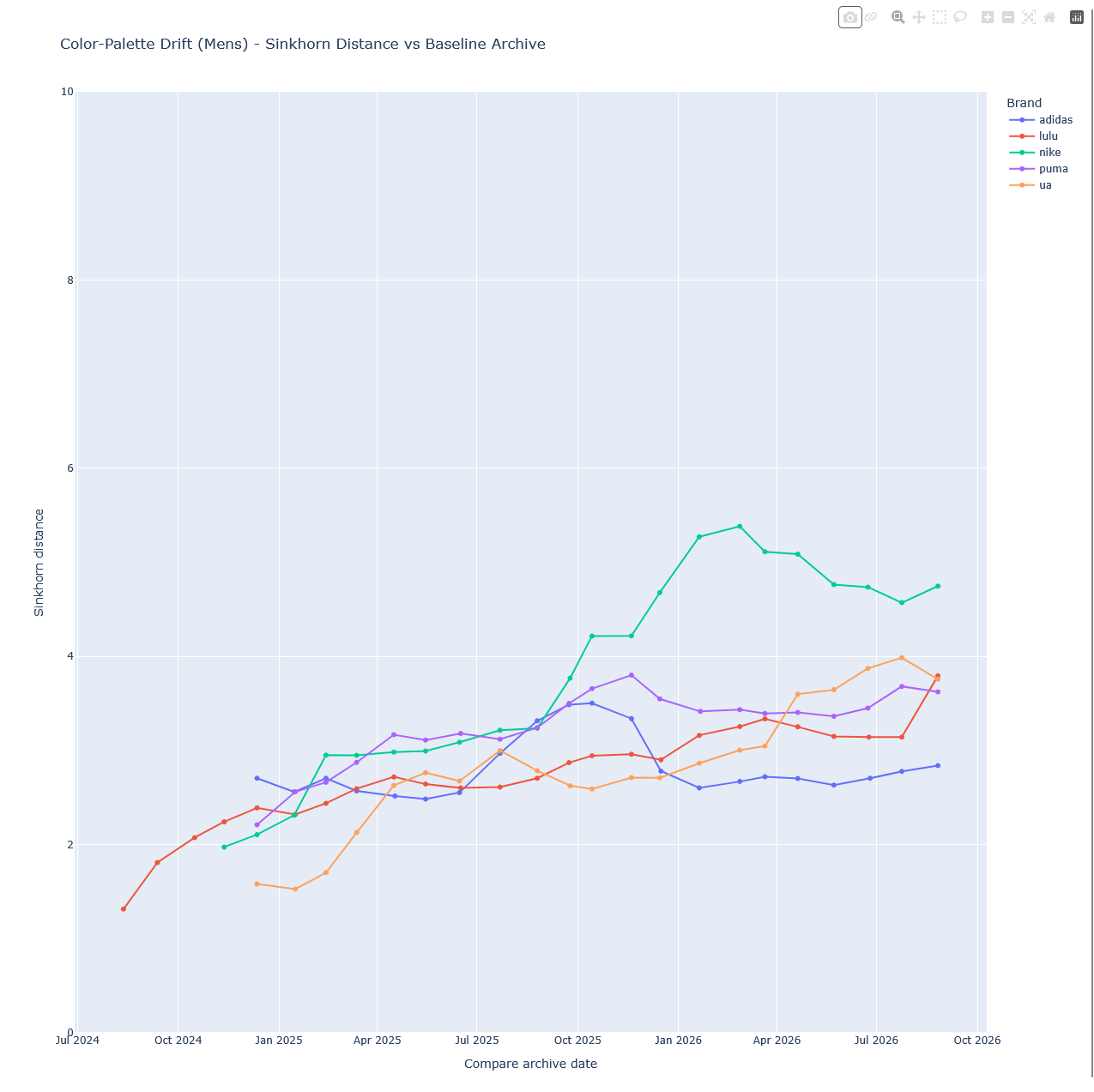
drift_comparison.html — tracks how a brand's color distribution shifts across the 16-month window; the mechanism for detecting seasonal and collection-level change over time.
❯ cli.py downsample <b>
Compresses each archive's ~250k raw palette points down to 1,900 weighted centroids via K-means, preserving distribution shape while making pairwise drift computation tractable (a 17,000× reduction in comparison count).
- Source: int constant —
drift/downsample.py:14 - Role: archive compression — how far archives are compressed before drift
- How to tune: no command — edit
N_CLUSTERSby hand atdrift/downsample.py:14and re-rundownsample+compute-driftfor the affected brand(s). The value is a compute/fidelity trade: 1900 was picked empirically for ~10k-product archives (250k raw palette points → ~62 B pairwise comparisons before compression, ~3.6 M after). Lowering it speeds Sinkhorn but coarsens the distribution fed to drift; raising it hurts drift compute time quadratically. Smaller archives (<1k products) can drop to 500–1000.
❯ cli.py compute-drift <b>
Runs CUDA-accelerated Sinkhorn (entropic-regularized Wasserstein, reg = 0.1) from every later downsampled archive back to a per-query baseline (that query's earliest downsampled archive), storing distances that quantify how far the palette has drifted from its starting point.
❯ cli.py visualize-drift
Emits one drift_comparison_<gender>.html per gender, each overlaying all five brands on a single interactive Plotly timeline. The y-axis is Sinkhorn distance from that brand's earliest archive for the gender's query — a fast screen for whether a brand's palette has shifted dramatically over the 16-month window.
coverage
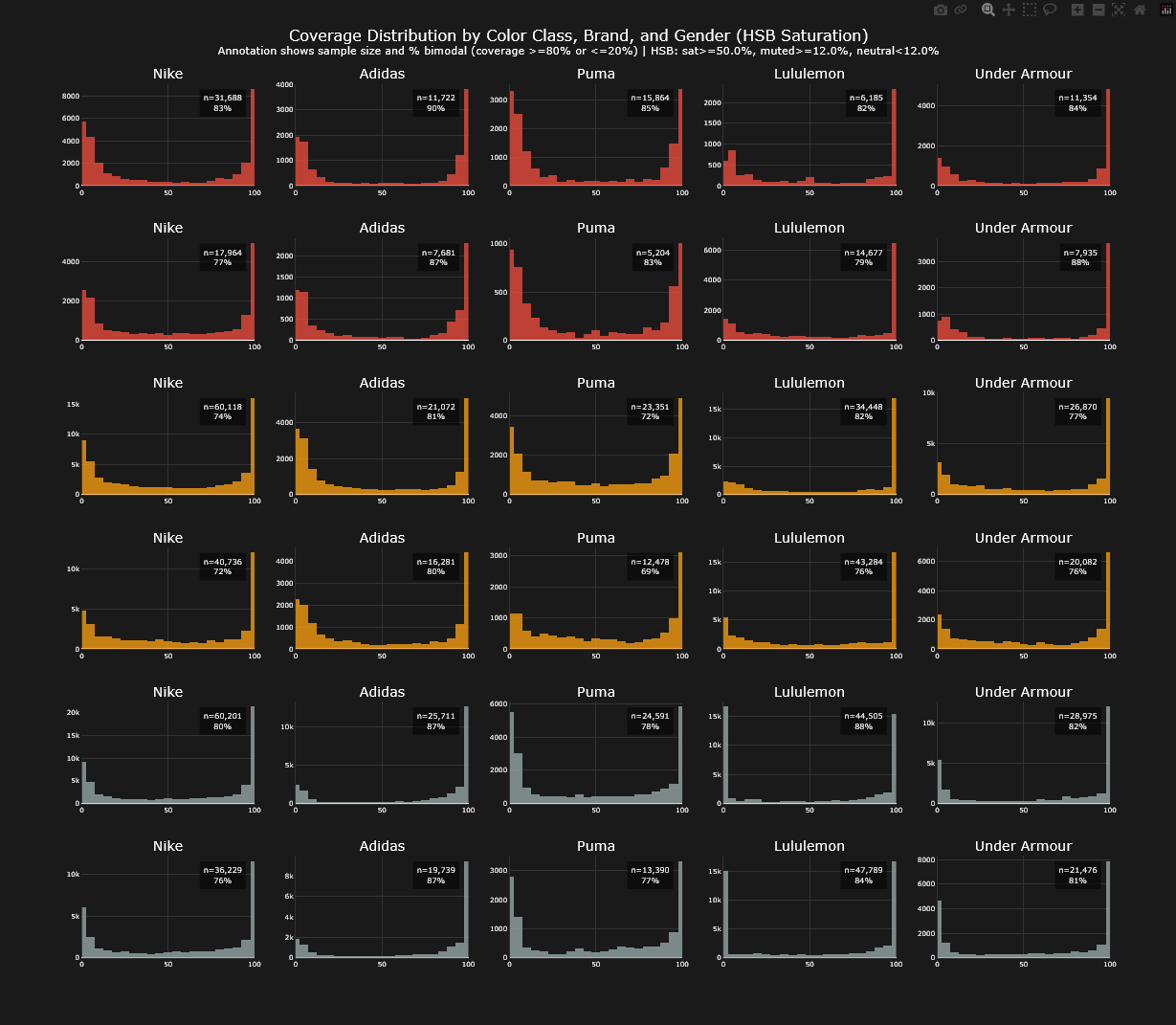
coverage_distribution.html — reports how much of each brand × gender segment actually reached the visualization: the recognition and segmentation coverage behind the ~34% of raw instances that survive, and where the rest leak out.
❯ cli.py visualize-coverage
Renders coverage_distribution.html: a 6-row × 5-column grid of histograms showing, for each brand × gender × color class (saturated / muted / neutral), how the per-product merged-cluster coverage percentages are distributed. Each panel is annotated with sample size and the share of clusters that are "bimodal" (coverage ≥ 80% or ≤ 20%) — i.e., how often a product's palette is dominated by one color versus split across many.
visualize_coverage.py:170-174).coverage/analyze_coverage.py:68-79 (called from visualize_coverage.py:177). Joins every product's raw 5-cluster palette (lab_l, lab_a, lab_b, perc) to its archive's query string, used to derive gender; rows without a derivable gender are dropped. Per-product clusters are then merged and bucketed into saturated / muted / neutral by HSB saturation (thresholds SATURATED_HSB, NEUTRAL_HSB from shared.hsb).† shared tunables
Some tunables configure more than one stage. They're documented once here; the stages that use them link back to this section.
- Source: int constants in
shared/palette_merge/palette_merge.py— HUE_MERGE_THRESHOLD = 25° (max hue gap to merge two chromatic colors), LOW_CHROMA_MERGE_THRESHOLD = 15 (chroma below which a color counts as low-chroma/near-neutral), LOW_CHROMA_MAX_DELTA_L = 35 (the lightness guard), plus NEUTRAL_CHROMA_THRESHOLD = 8 (chroma below which a color has no usable hue). Shared — the same merge primitive also builds the palettes the archetype classifier consumes, so changing it moves two deliverables. - Role: per-product merge that runs before HAC Pass 1. For each product it collapses colors that are just lighting artifacts (highlights/shadows) into one and keeps the dominant survivor as that product's color for clustering. Two low-chroma/neutral colors merge only if their lightness is within LOW_CHROMA_MAX_DELTA_L (35) — this keeps black+white from collapsing together; two chromatic colors merge if their hue is within HUE_MERGE_THRESHOLD (25°), with no lightness guard — which is why navy over-merging into royal blue is a known, unfixed limitation, not something these thresholds prevent.
- How to tune: data-driven, then by hand.
① Build the labeling tool: runarchetype-review --strata pair-features— one command that classifies (if needed), draws a boundary-oversampled sample (deliberately loaded with color pairs sitting near the hue/chroma/ΔL thresholds, which fits merge-rule tuning far better than the default archetype-stratified sample), and rendersarchetype_validation_pairfeatures.html(separately named so it can't clobber an archetype-accuracy sample). The default--strata archetypealso captures merge labels in passing, but under-samples the ambiguous pairs this decision hinges on.
② Label: open that page and click each color swatch to cycle it into the right group (which of a product's colors are really the same); exportmerge_labels_all_brands.csv.
③ Fit + apply: runtune-merge-rules --input merge_labels_all_brands.csv --propose-constants— it scores the live merge rule against your labels and proposes new values in the shape of the constants (e.g. HUE_MERGE_THRESHOLD 25 → 27, acc 94.7% → 95.1%) with a cross-validation guard. Edit the constants by hand inpalette_merge.py; the tool never writes them. - Tuning output:
outputs/merge_rule_discovery/— the proposals (merge_constant_proposals.txt,merge_constant_sweep.csv), decision-boundary HTML plots (labeled pairs against hue-difference and ΔL), andpairwise_features.csv. Adding--fit-treeinstead also writes a decision tree (merge_rules_discovered.txt).
Docker usage
Docker is the intended path — the container ships with the CUDA stack, the Python dependencies, and the right paths for images and outputs. Every cli.py <command> <args> invocation in this document translates to the same wrapper.
One-time setup
cd color-analytics
docker compose build
Then, once per PowerShell session:
$env:POSTGRES_PASSWORD = "<your db password>"DB_HOST is already wired to host.docker.internal in docker-compose.yml:13, so no host configuration is needed if your database runs on the machine you're running Docker on. POSTGRES_PASSWORD is not declared in the compose file's environment: block, so it has to be forwarded explicitly on each run (see the translation rule).
The translation rule
Everywhere in this document you see
cli.py <command> <args>run it from the color-analytics directory as
docker compose run --rm -e POSTGRES_PASSWORD=$env:POSTGRES_PASSWORD `
    pipeline python cli.py <command> <args>
--rm removes the container after the command exits, so repeated runs don't leave a graveyard of stopped containers behind. The backtick at the end of the first line is PowerShell's line continuation — write it as one line if you prefer.
What the compose file already handles for you
- The repo is mounted at
/app, so anything written tooutputs/…inside the container appears incolor-analytics/…/outputs/on the host. - Product images are mounted at
/app/imagesfrom the sibling03_images/tree (docker-compose.yml:11). - GPU access is passed through (
docker-compose.yml:20-24) — required forsegment(YOLO inference) andcompute-drift(CUDA Sinkhorn).
Two worked examples
Brand-required stage:
docker compose run --rm -e POSTGRES_PASSWORD=$env:POSTGRES_PASSWORD `
    pipeline python cli.py segment nike
Multi-brand deliverable:
docker compose run --rm -e POSTGRES_PASSWORD=$env:POSTGRES_PASSWORD `
    pipeline python cli.py archetypes
Running without Docker
If you have the CUDA + Python stack installed locally, the same python cli.py <command> <args> works from color-analytics with $env:POSTGRES_PASSWORD and $env:DB_HOST set in your shell. Docker is the default because reproducing that stack from scratch is the harder half of the setup.